
Your Lnk.Bio page is more than a collection of Lnks. It's your personal space on the internet, a place to showcase your brand, share your content, and connect with your audience.
And now, it can look even more like a fully customized website!
We're introducing Background Images for individual blocks, giving you the freedom to add beautiful photos, illustrations, and branded visuals behind your content.
From transforming your profile into a stunning hero-style header to showcasing your products, promoting events, and highlighting important information, the possibilities are endless.
Available on Unique plans and above, these new customization options build on our previous major improvements to the Lnk.Bio Page Editor, bringing even more creative freedom to your page.
Turn your profile into a beautiful Hero Banner
First impressions matter, especially when someone visits your page for the first time.
Your profile is often the first thing visitors see. It introduces who you are, what you do, and what they can expect from your content.
Now, you can make that introduction unforgettable.
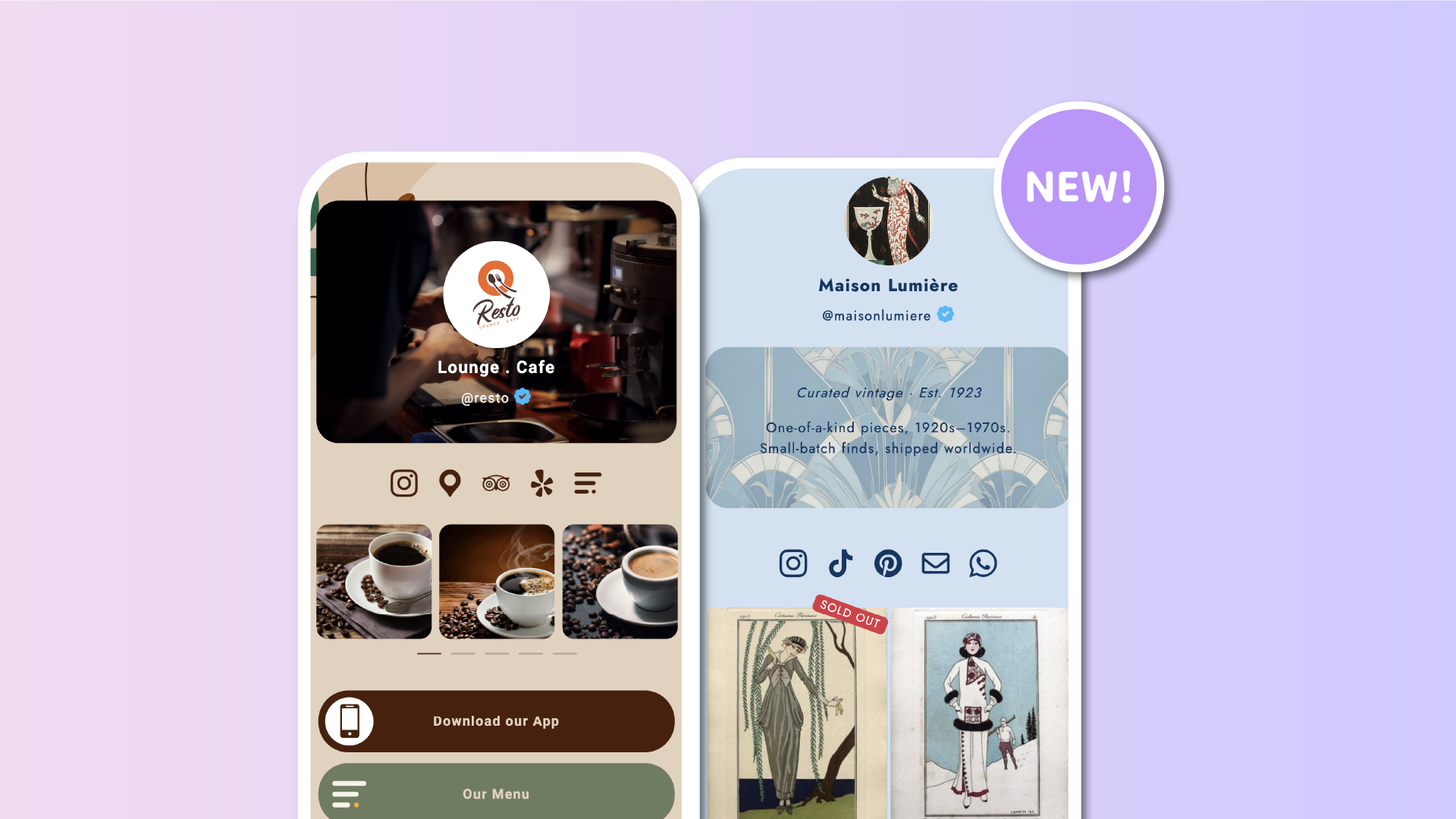
You can add a background image directly to your Profile block, placing a beautiful cover photo behind your profile picture, name, and username.
Want something even more eye-catching?
Simply select the new Hero banner option under your block's vertical spacing settings.
This gives your profile a taller, more prominent appearance, transforming your background image into a stunning website-style header.
There's no separate block to add or complicated setup. It's your existing profile, with more styling possibilities than ever.
Imagine the possibilities:
-
Creators and influencers: Feature a lifestyle photo or branded visual that instantly communicates your personality.
-
Online shops: Showcase your latest collection or a signature product as soon as visitors arrive.
-
Musicians and artists: Use album artwork, concert photography, or creative visuals to set the mood.
-
Restaurants and venues: Welcome visitors with a beautiful photograph of your space.
-
Businesses and professionals: Create a polished header that makes your page feel like a dedicated website.
Your profile picture, name, and username remain front and center, while your background image gives the entire section a completely new personality.
One image can transform the first impression of your entire page.
Add background images to your content blocks
Why stop at your profile?
The new Background Image feature also works across a wide range of content blocks, allowing you to create visually rich sections throughout your page.
You can now add background images to:
-
Title and Headline: Make important messages stand out with a beautiful visual backdrop.
-
Bio and Text: Add personality and atmosphere to your introductions and descriptions.
-
Countdown: Build excitement for launches, events, and special announcements.
-
Opening hours: Display your business hours over a photo of your store, restaurant, or venue.
-
Counter: Highlight milestones and achievements with a custom background.
-
Newsletter: Make your email signup section more inviting.
-
Contact form: Create a branded contact section that feels like part of your website.
-
Reviews: Showcase customer feedback with a distinctive visual style.
-
Icons: Give your social and platform icons their own background.
-
Donate: Create a compelling visual section for fundraising and charitable causes.
-
Share: Make your page-sharing section more visually engaging.
Instead of relying exclusively on solid colors, you can now use photography, illustrations, textures, and branded imagery to make each section unique.
And because every supported block can have its own background, you're free to create different visual experiences throughout your page.
Create beautiful sections for every occasion
Background images aren't just decorative. They can help communicate your message more effectively.
Here are a few ways to put them to work.
Launching a new product?
Add a product photo behind your Countdown block to build anticipation for the release.
Running a restaurant or café?
Display your Opening hours over a beautiful photograph of your venue, giving visitors a taste of the atmosphere before they arrive.
Growing your newsletter?
Place your signup form over a branded image that reflects your content and encourages visitors to subscribe.
Promoting an event?
Use an event poster or promotional image behind a Headline or Text block to create a dedicated announcement section.
Supporting a cause?
Give your Donate block a meaningful visual background that helps communicate the mission behind your fundraising.
With individual block backgrounds, your Lnk.Bio page can feel more like a carefully designed landing page, with each section serving its own purpose.
Four spacing options, including the new Hero Banner
A great background image deserves the right amount of space.
That's why we've expanded the block spacing options to give you even more control over your design.
You can now choose between four vertical spacing settings:
-
Small: A compact appearance that keeps your content close together.
-
Medium: Balanced spacing for everyday content.
-
Large: Extra breathing room for sections that deserve more attention.
-
Hero banner: A taller, more prominent section designed to showcase your background image.
The new Hero banner spacing is particularly exciting for your profile, where it creates the kind of large visual header you'd expect from a professionally designed website.
But you can also experiment with spacing on other supported blocks to find the perfect balance between imagery and content.
Match your background with custom colors
Images and colors work best together.
Alongside background images, we're also introducing another improvement: custom colors for the Profile block.
Previously, our upgraded Page Editor introduced individual background and text colors for content blocks.
Now, your profile gets the same flexibility.
You can choose:
-
Background color: Give your profile its own background, independent of your page's overall theme.
-
Text color: Customize the appearance of your name and username to complement your chosen image.
For example, you could use a dark photographic banner with light-colored text, or a bright, colorful background with darker lettering.
And don't worry about your verification status: the verified badge always retains its official blue color, regardless of your styling choices.
You can also combine a background image with a background color to create a more cohesive visual design.
Rounded or squared? Your page, your style
Every brand has its own aesthetic.
Some prefer soft, rounded corners. Others favor sharp, modern edges.
Background images work with both.
Choose rounded corners for a softer appearance, or squared corners for a more structured, website-like design.
Combine your preferred corner style with background images, colors, and spacing to create sections that feel consistent with your brand.
Whether you're building something minimal and elegant or bold and colorful, the choice is yours.
Upload your favorite images in seconds
We've made adding background images as straightforward as possible.
You can upload images in three popular formats:
-
JPG
-
PNG
-
WEBP
Images can be up to 20MB, so you don't need to manually resize large photos before uploading them.
Lnk.Bio automatically processes and optimizes larger images, reducing the final file size to a maximum of 2MB.
That means you can use beautiful, high-quality photos without unnecessarily slowing down your page for visitors.
Every upload is also checked before going live, helping keep the platform safe.
And if you change your mind about an image, you can replace or remove it whenever you like.
Duplicate blocks and pages without losing your design
Creating a beautiful page takes time, and we want to make it easy to reuse your work.
Background images are fully integrated with the improved Page Editor.
When you duplicate a block, its background image comes along with its content and settings.
The same applies when you copy an entire page.
Your carefully chosen images, colors, and styling are preserved, so you can reuse your favorite designs without starting from scratch.
This is especially useful if you manage multiple pages, create seasonal campaigns, or frequently update your content.
How to add a background image to your blocks
Ready to give your page a new look?
Getting started is easy.
-
Open My Page → Content in your Lnk.Bio dashboard.
-
Find your Profile block or any other supported content block.
-
Click Edit block to open its contextual menu.
-
Select Background image.
-
Upload your preferred JPG, PNG, or WEBP image.
-
Adjust your block's spacing, colors, and corner style to complete the design.
For a particularly impressive profile header, choose the new Hero banner vertical spacing option.
You can repeat the process for as many supported blocks as you like, creating a page with its own distinctive visual identity.
Available on Unique plans and above
The new Block Background Images feature, including the Hero banner spacing option, is available to members on Unique plans and above.
If you're already on an eligible plan, you can start transforming your page right away.
These additions complement the recently introduced per-block colors, fonts, and other customization improvements, making Lnk.Bio more flexible than ever.