
Managing multiple accounts means managing responsibility too. As teams grow, one question becomes increasingly important:
“Who changed what?”
That’s why we’re introducing Audit logs for Multi-account Unique plans on Lnk.Bio.
You can now access a complete history of meaningful actions performed across managed accounts, giving teams more visibility, better accountability, and clearer communication with clients.
A complete history of account activity
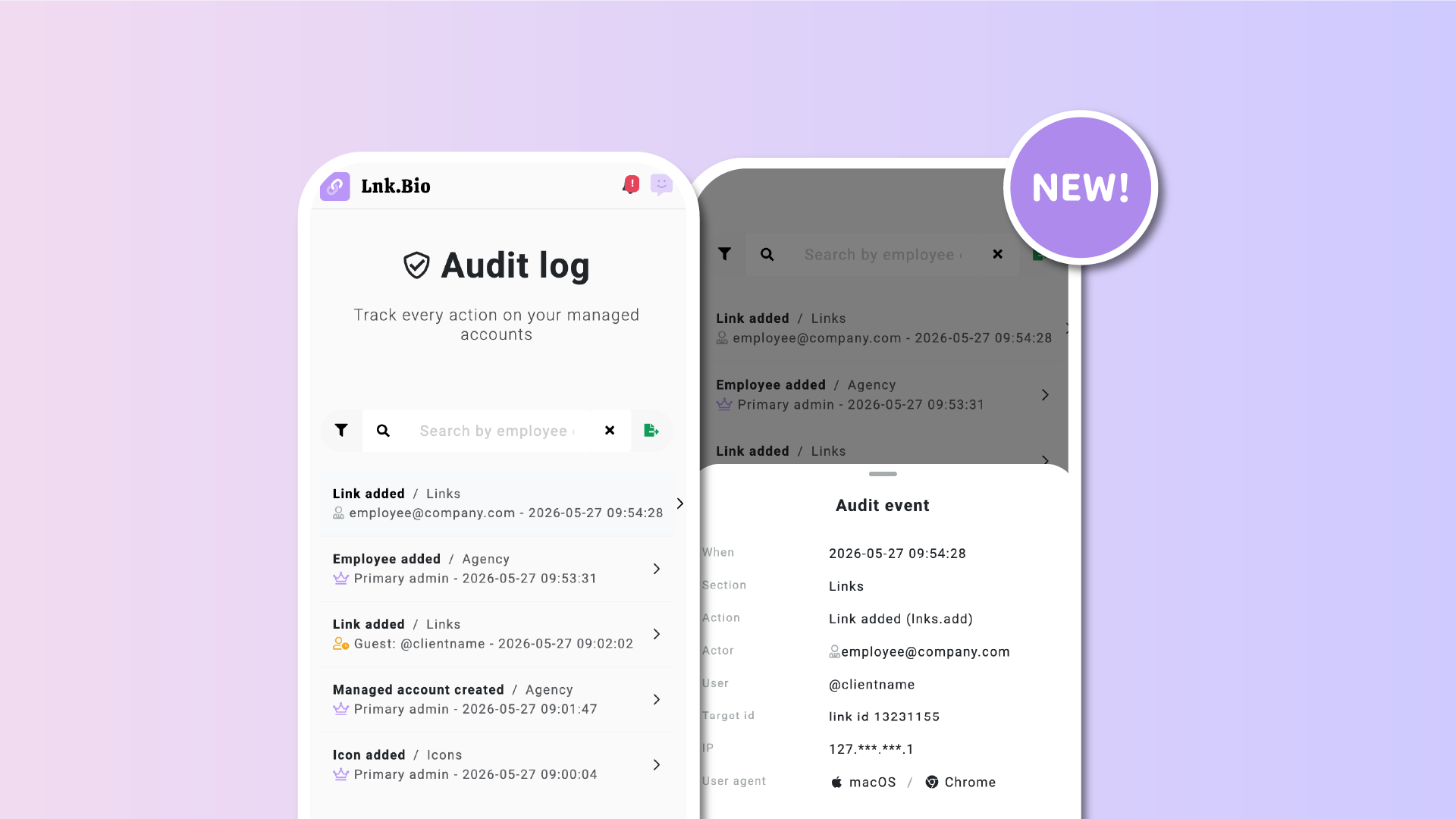
The new Audit log gives a centralized view of important actions happening across managed accounts.
Every event includes:
- When it happened
- Who performed the action
- What changed
- Where the action came from
This creates a reliable timeline of activity that helps teams understand exactly what happened on an account at any moment.
See who did what
One of the most important parts of the new system is clarity around ownership of actions.
The Audit log distinguishes between:
- Account owners
- Employees and collaborators
- Clients accessing accounts through guest access
Each action is tied to the responsible person, including employee email information where relevant.
This is especially useful when multiple people collaborate on the same account.
Clear, human-readable events
Logs are designed to be understandable immediately, without technical jargon.
Examples include:
- “Link added”
- “Page deleted”
- “Password changed”
- “Employee added”
- “Theme updated”
The goal is simple: quickly understand what changed without digging through complicated system data.
Visibility into security-related activity
The Audit log also tracks important security events, including:
- Password changes
- 2FA setup
- Passkey updates
- Email changes
- Account deletion or deactivation
This gives teams a much clearer picture of account security and helps identify unexpected activity early.
Built for real-world workflows
This feature was designed around the realities of managing multiple accounts.
Resolve client disputes faster
Sometimes clients forget what they changed, or assume someone else made a modification.
Now, you can quickly verify:
- Who deleted a page
- Who changed settings
- Who scheduled or unpublished content
The full history is there.
Better internal accountability
As teams grow, visibility matters.
Account owners can now understand:
- Which employee worked on which account
- What changes were made
- When they happened
This helps create cleaner workflows and stronger operational oversight.
Support larger client conversations
Larger clients increasingly ask operational and compliance-related questions.
One common one:
“Do you maintain audit logs?”
Now the answer is yes.
The system includes:
- Filtering tools
- Search
- Exportable CSV reports
making it easier to support procurement and operational reviews.
Powerful filtering and exports
The Audit log includes tools to quickly find the information you need.
You can filter by:
- Date range
- Section
- Actor type
- Specific employee
- Specific managed account
There’s also:
- Search by employee email
- One-click CSV export
Whether you’re reviewing a recent issue or preparing a report for a client, the information stays easy to access.
Private and access-controlled
Audit logs are strictly private and only visible to authorized administrators of the Multi-account workspace.
They are never publicly accessible and are designed purely for internal accountability, operational visibility, and security monitoring across managed accounts.
Sensitive information such as IP addresses is also partially masked to balance traceability with privacy.
Focused on meaningful actions
The Audit log is intentionally designed to track actions that actually matter.
This includes:
- Link management
- Page and block operations
- Style and branding changes
- Security actions
- Team management events
At the same time, cosmetic or non-impactful preferences are excluded to keep the logs focused and useful.
Built for teams that are growing
As organizations scale, workflows evolve.
More clients. More collaborators. More moving parts.
The new Audit log helps teams operate with more confidence, more transparency, and better visibility across everything happening inside their Lnk.Bio accounts.
Audit logs are available on Multi-account and Agency Unique plans. You can reach them from Menu => Settings => Audit Log