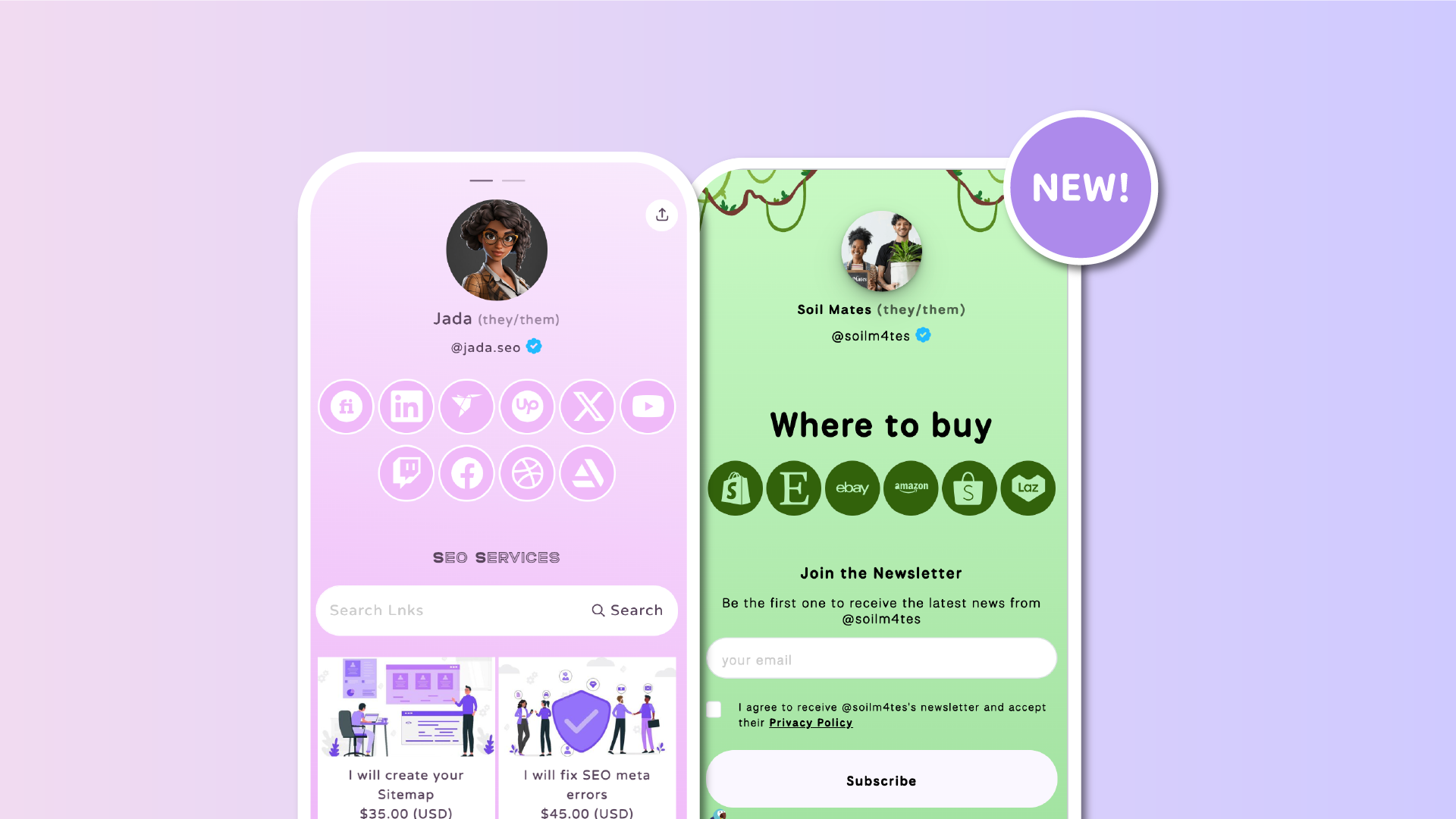

Your Lnk.Bio page is all about making your content easy to explore. Sometimes that means highlighting a few key Lnks. Other times, it means giving quick access to many destinations at once.
That’s why we’re introducing new icon grid layouts for Lnks.
These layouts allow you to display your Lnks as compact icons, creating a more visual, organized, and scannable experience for your visitors.
More links, less scrolling
With the new icon grid layouts, Lnks can now be displayed in a much more compact format:
-
Up to 6 Lnks per row on mobile
-
Up to 12 Lnks per row on desktop
This makes it possible to show many Lnks at once without increasing page length, reducing scrolling and helping visitors find what they need faster.
Designed for visual navigation
Instead of traditional full-width buttons, these layouts focus on icons and instant recognition.
This works especially well when:
-
You’re linking to many marketplaces like Shopify, Etsy, Amazon, or eBay
-
You want to showcase platforms where your products are available
-
You have multiple recognizable destinations
-
You want a cleaner, more minimal look
Icons make navigation faster because users can recognize where they want to go at a glance.
Different from the Icons section
You might already be using the Icons section on Lnk.Bio. While both features are visual, they serve different purposes.
Icon grid layouts for Lnks are:
-
Larger and more prominent, making them easier to tap and more visible
-
Fully customizable with your own images, just like regular Lnks
-
Styled consistently with your Lnk settings, including borders and colors
In contrast, the Icons section is designed for smaller, quick-access links, while these new grid layouts are meant to structure and highlight groups of Lnks in a more visual and flexible way.
A more flexible page design
These new layouts give you more control over how your page is structured.
You can:
-
Use icon grids for secondary or grouped Lnks
-
Keep full-width buttons for primary actions
-
Combine both to create a clear visual hierarchy
For example, you might highlight your main offer at the top, and then use an icon grid below for “Where to buy” or partner platforms.
Two layout options to choose from
We’ve introduced two icon grid layouts, so you can pick the style that fits your page best.
Either Square icons or Circle icons
Both options are designed to:
-
Keep your page clean and structured
-
Improve readability and scanning
-
Maintain visual consistency across your design
They give you flexibility without adding complexity.
Perfect for many use cases
Icon grid layouts are especially useful for:
-
Affiliate and partner links
-
Marketplaces and stores
-
Social and platform directories
-
Resource hubs with many destinations
-
Any page where space and clarity matter
They help you present more options in a compact, intuitive way.
How to enable icon grid layouts
You can switch to the new layouts like any other layout.
Access the My Page => Content section, scroll down until you see your Lnks block, and click "Edit Layout".
More ways to design your page
This update is all about giving you more visual control.
Some pages benefit from bold, prominent buttons. Others work better with compact, icon-based navigation. Now you can choose what fits your content best, or combine both approaches for a more dynamic layout.
As always, we’ll keep expanding the ways you can design your Lnk.Bio page, making it more flexible, expressive, and effective.











