
Your Lnk.Bio page should be as easy to edit as it is to create.
Over the years, we've added dozens of content blocks to help you build richer, more dynamic pages. As the platform grew, so did the need for a faster, more intuitive editing experience.
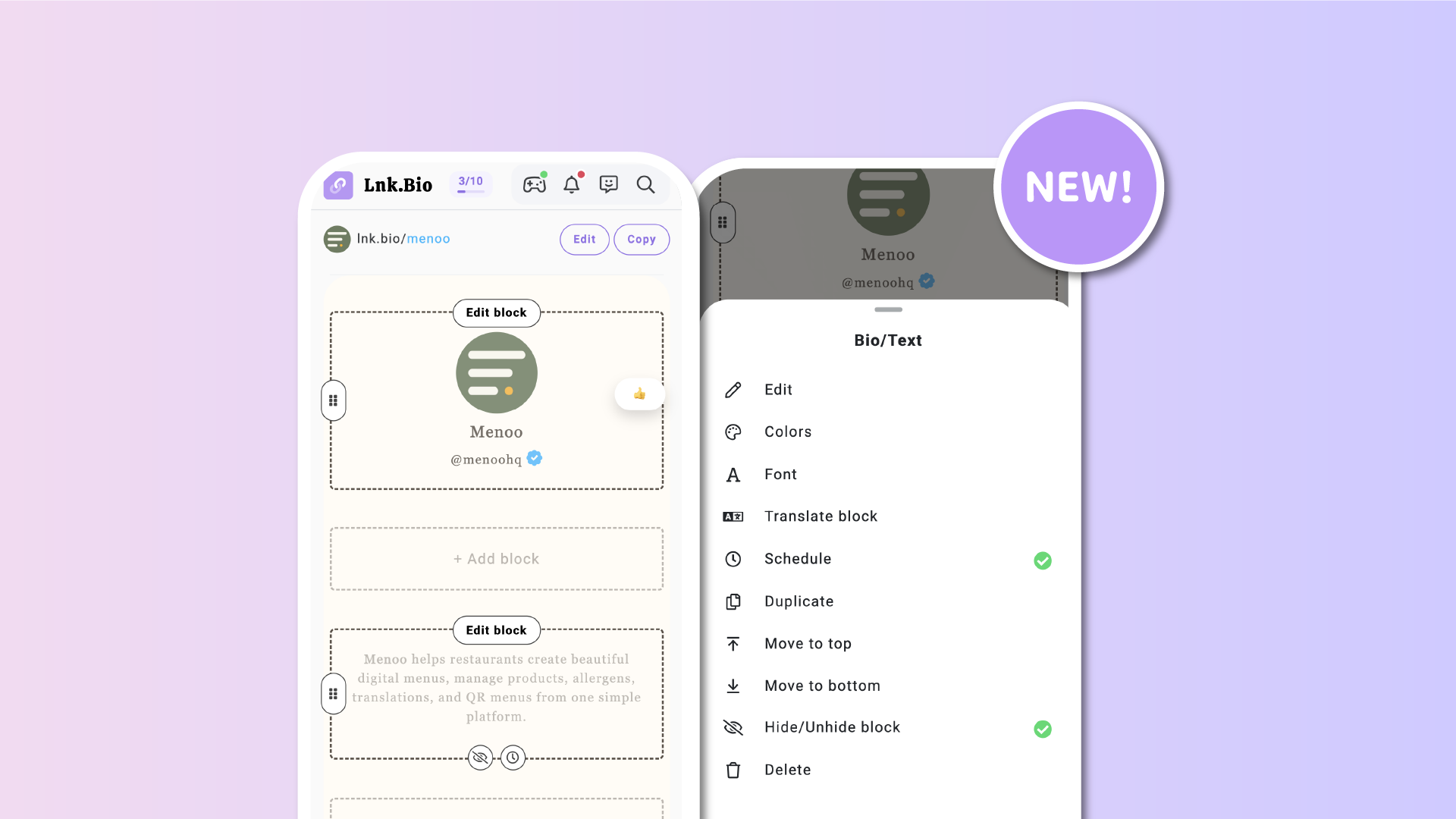
Today, we're introducing the biggest upgrade ever to the Page Content Editor (My page => Content).
From drag & drop editing to block duplication, scheduling, custom styling, and countless workflow improvements, managing your page is now smoother than ever.
A completely redesigned editing experience
The new editor brings everything you need exactly where you'd expect it.
Every block now has a single Edit block button that opens a contextual menu, following the same familiar experience already available in the Lnks section.
Instead of hunting through different dialogs and popups, every action is now available from one place.
Cleaner.
Faster.
More consistent.
Drag, drop, and reorganize instantly
Reordering your page is now as simple as dragging a block.
Grab the handle, move it wherever you want, and your changes are saved immediately.
No separate "Move blocks" mode.
No additional confirmation.
For larger pages, we've also added Move to top and Move to bottom shortcuts, letting you reposition blocks across your page with a single click.
Duplicate or move blocks in seconds
Building similar sections no longer means starting from scratch.
You can now duplicate any block with one click, creating an exact copy including its content, appearance, and settings.
Managing multiple pages?
Blocks can also be moved directly from one page to another while preserving all their configuration.
See your content status at a glance
Managing complex pages is now much easier.
Status icons also show when a block is:
- Hidden
- Scheduled
Everything is visible without opening the editor for each block.
Add content faster
Adding icons, photos, and causes is now much more intuitive.
Instead of searching for dedicated buttons, simply use the + item directly inside each block.
It's a small change that makes building pages significantly faster.
Schedule every block
Available on MINI plans and above, you can now schedule individual content blocks.
Choose exactly when a block should appear, disappear, or both.
It's perfect for:
- Product launches
- Limited-time offers
- Seasonal campaigns
- Event announcements
- Temporary promotions
Scheduling follows the same timezone-aware system already available for Lnks, making it familiar and reliable.
Give every block its own style
Available on Unique and Ultra plans, blocks no longer have to share the same appearance.
You can now customize individual blocks with their own:
- Background color
- Text color
- Vertical spacing
- Corner style
Want an announcement to stand out?
Need a call-to-action with a different look?
Now every block can have its own personality while still fitting naturally into your page.
Customize fonts block by block
Also available on Unique and Ultra plans, you can now choose a different font for every individual block.
Browse the complete font library, search by name, or discover trending and top fonts.
Whether you're highlighting a quote, creating a distinctive section, or simply experimenting with typography, your page is now more flexible than ever.
Better tools for multi-page creators
If you manage multiple Lnk.Bio pages, editing is now even smoother.
A new page switcher lets you move between pages instantly, while the View live shortcut always opens the exact page you're editing.
Even better, duplicating a page now copies everything, including hidden blocks, schedules, and custom block styling.
Your layouts remain exactly as you designed them.
The editor you've been waiting for
This update isn't about adding one new feature.
It's about making every feature easier to use.
Whether you're creating your very first page or managing a complex multi-page profile with scheduled campaigns and custom layouts, the new Page Content Editor helps you work faster, stay organized, and spend more time creating instead of managing.
We think it's the best editing experience Lnk.Bio has ever offered, and we can't wait for you to try it. If you have feedback or ideas on how to improve this even further, please let us know.