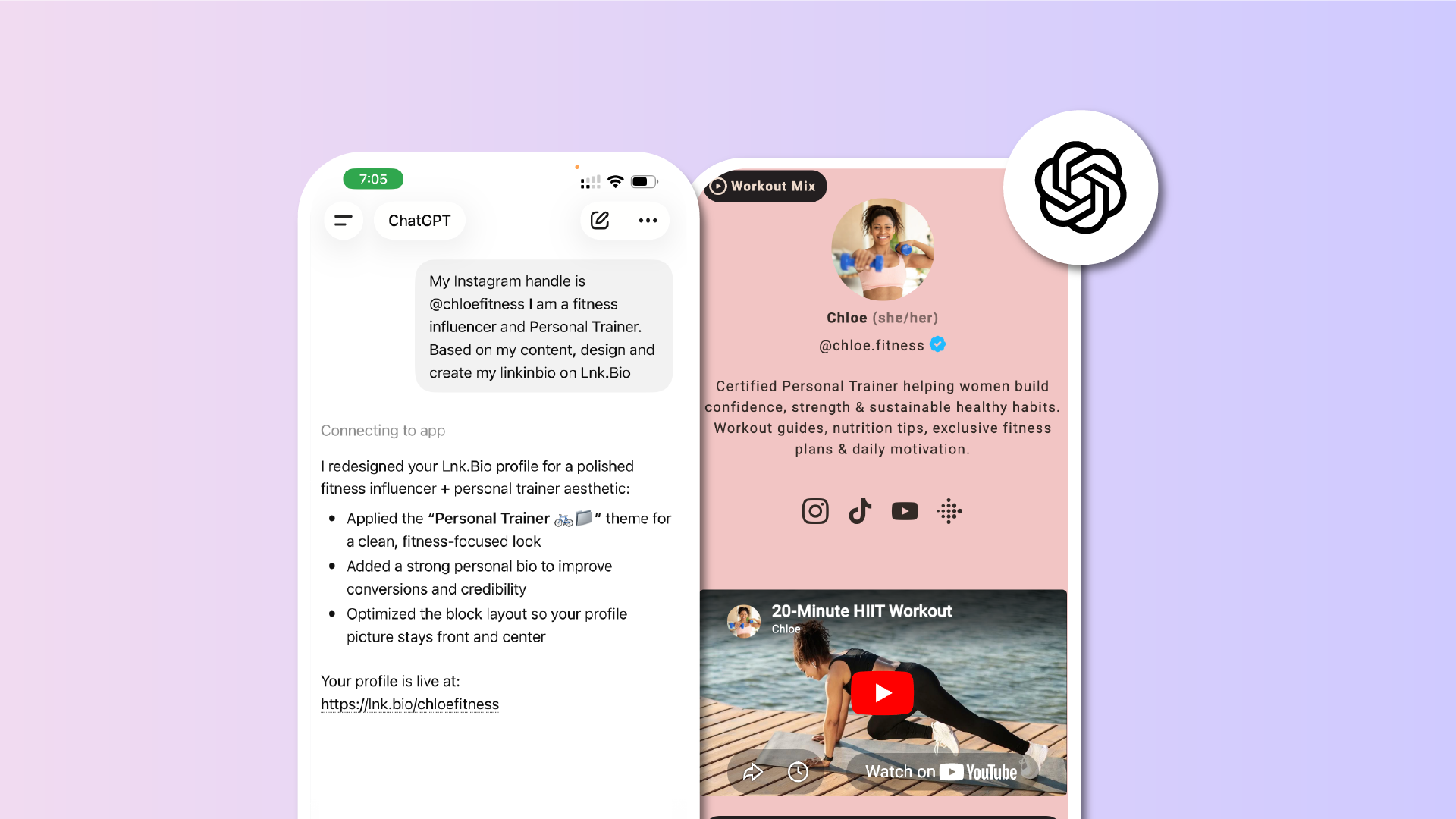

ChatGPT is now one of the most-used assistants in the world.
Lnk.Bio already lets you build and manage your page from your dashboard, on every device you use every day. Now, we're taking it one step further. You can now manage your Lnk.Bio page entirely from inside ChatGPT.
Connect your Lnk.Bio account to ChatGPT
With this new integration, you can link your Lnk.Bio account to ChatGPT in just a few clicks.
This means:
- No need to switch between apps
- Your existing Lnk.Bio page works as it is
- Setup takes just a few steps
It's a simple way to bring your link-in-bio management into the assistant you already use.
Update your page just by chatting
Once connected, you can ask ChatGPT to make changes to your page in plain language.
You can say things like:
- "Add my new YouTube video to my Lnk.Bio"
- "Move my Patreon link to the top"
- "Change my bio to say…"
ChatGPT performs the action for you. No dashboard required.
Manage your links the easy way
Inside ChatGPT, you can fully manage every link on your page.
This includes:
- Adding, editing, and deleting links
- Reordering links in any sequence
- Updating titles, URLs, and descriptions
- Creating and maintaing groups
- Adding custom blocks to the page
- Create sub-pages and their content
Your linkinbio stays organized without ever opening a tab.
Customize your design through conversation
You can also adjust the look of your page by asking.
This covers:
- Themes, fonts, and color choices
- Wallpapers and backgrounds
- Icons and content blocks
Your style updates apply instantly to your live page.
A first for link-in-bio
Lnk.Bio is the first link-in-bio service available inside the ChatGPT App Store.
This ensures:
- Early access to a new way of managing your page
- A natural, conversational workflow
- Direct integration with the assistant millions of people already use
It's a new chapter for how creators and businesses keep their online presence up to date.
Available on the official ChatGPT App Store
This integration is published through the official OpenAI App Store, ensuring reliability and full compliance with OpenAI's guidelines.
It's designed to work smoothly and securely with your Lnk.Bio account and your ChatGPT account.
Keep your existing workflow
The Lnk.Bio dashboard remains unchanged.
You can still:
- Manage your page from the web and mobile apps
- Use every feature you already know
- Switch freely between the dashboard and ChatGPT
The ChatGPT app simply adds another way to manage your Lnk.Bio.
How to enable Lnk.Bio in ChatGPT
Setting up the integration takes less than a minute.
Here's how to do it:
- Open ChatGPT on web, desktop, or mobile
- Navigate to "Apps" and search for "Lnk.Bio" or go directly to the Lnk.Bio app page in the ChatGPT App Store
- Click Try it to add the app to your ChatGPT account
- When prompted, connect your Lnk.Bio account and authorize access
- Start a new chat and ask ChatGPT to make changes to your page
Once connected, you can return to ChatGPT at any time to keep managing your Lnk.Bio.
A few examples to get started
If you're not sure what to say first, here are some prompts that work right away.
You can try:
- "This is my website: https://mywebsite.com. Browse it, extract my brand colors, style, and main links, then build my Lnk.Bio page to match."
- "My Instagram is @myhandle. Look at my profile, find my social links, pick a theme that fits my aesthetic, and set up my entire Lnk.Bio page."
- "Add a new link to my YouTube channel on my Lnk.Bio"
- "Reorder my links so my newest one appears first"
- "Change my Lnk.Bio theme to dark mode"
- "Update my bio to say 'Photographer based in Milan'"
- "Switch to a different font on my Lnk.Bio page"
ChatGPT will confirm any major change before applying it.
What about Claude or other AI Chats?
The Lnk.Bio integration is built on the Model Context Protocol (MCP), an open standard that lets AI assistants connect to apps beyond ChatGPT.
This means the same integration can also run on Claude.We're still waiting for acceptance in their integrations gallery, but in the meantime if you'd like to test our MCP on Claude:
- Get in touch at [email protected]
- We'll be happy to help you set it up
- You'll get the same conversational management, in your AI of choice
It's the easiest way to manage your Lnk.Bio wherever you prefer to chat.
Free for all Lnk.Bio users
The ChatGPT integration is available today, free for everyone.
If you don't have a Lnk.Bio yet, you can create one in seconds and connect it to ChatGPT right after.
Your link-in-bio just became part of your daily AI conversations.











